
Building a VMware SelfService Portal with PowerShell and Azure
Last month I tried to build a SelfService Portal for VMware vCenter as an alternative to a full automation platform. The goal was to let users provision VMs in minutes, without the overhead that comes with running a full platform. The whole thing runs on Azure services for under $15 per month.
I wanted to see how far I could get using GitHub Copilot and Claude Code to generate most of the code, while still building something I understand and can maintain myself.
Why build this?
I do not work with VMware in my professional life anymore, but I have a background as a VMware System Administrator and still have access to a lab running vSphere. I wanted to bridge the gap between my current Cloud/DevOps work and my past VMware experiences, many of the technologies I talk about here, I wouldn't have used without working closely with Developers and Cloud Solutions.
But we could have built a Self-Service Portal for anything else, or make it more generic down the road.
What to build?
Automation platforms like vRealize Automation (now Aria Automation) are powerful, and so are open-source alternatives. But in many cases you end up using a fraction of the feature set. If all you need is to let users spin up VMs from approved templates on approved clusters and networks, do you really need a full platform? I wanted to try to see if I could build a simple one.
I know the PowerCLI commands. I know what vCenter can do and how to talk to it. This project was about putting the pieces together in a new way rather than learning new technologies from scratch.
Goals
- A Self-Service portal on plain HTML and CSS with Bootstrap.
- Azure Static WebApps for hosting the frontend with Entra ID authentication out of the box.
- Azure Functions with PowerShell for the backend API, using the same PowerCLI commands I already know.
- Azure Table Storage for configuration and state management, keeping the backend stateless
- Cloud-Init support for Linux templates through guestinfo properties.
- Users can log in, provision VMs, view their existing VMs, and delete them.
- Admins can manage allowed VM Templates, Cloud-Init templates, clusters, networks, and system names through the frontend.
- Total monthly cost under $15.
How I started
I created two repositories, one for the backend and one for the frontend, and connected them to an Azure Static WebApp and Azure Function
Then I opened GitHub Copilot CLI and gave it my first prompt:
I want to build a self-service portal for VMware vCenter using Azure Static WebApps for the frontend and Azure Functions with PowerShell for the backend. The backend should use PowerCLI to talk to vCenter and Azure Table Storage for configuration. The frontend should be simple HTML with Bootstrap. Can you help me get started with the backend code?. The frontend should have a form to create VMs and an admin section to manage templates and clusters. The backend should have endpoints for creating VMs, listing VMs, and managing config. I want to keep it simple and cost-effective, so no complex frameworks or databases. The form should include the following:
- VM Name
- Template (dropdown) (A Display Name that maps to a Template in vCenter and a Cloud-Init URL)
- Cluster (dropdown) (A Display Name that maps to a Cluster in vCenter)
- Network (dropdown) (A Display Name that maps to a Network in vCenter)
- System Name (dropdown)
That gave me a first iteration that actually worked. It set up environment variables for credentials, a simple endpoint to create VMs, and basic error handling. From there I kept asking for more features and refining the code.
Whats the architecture?
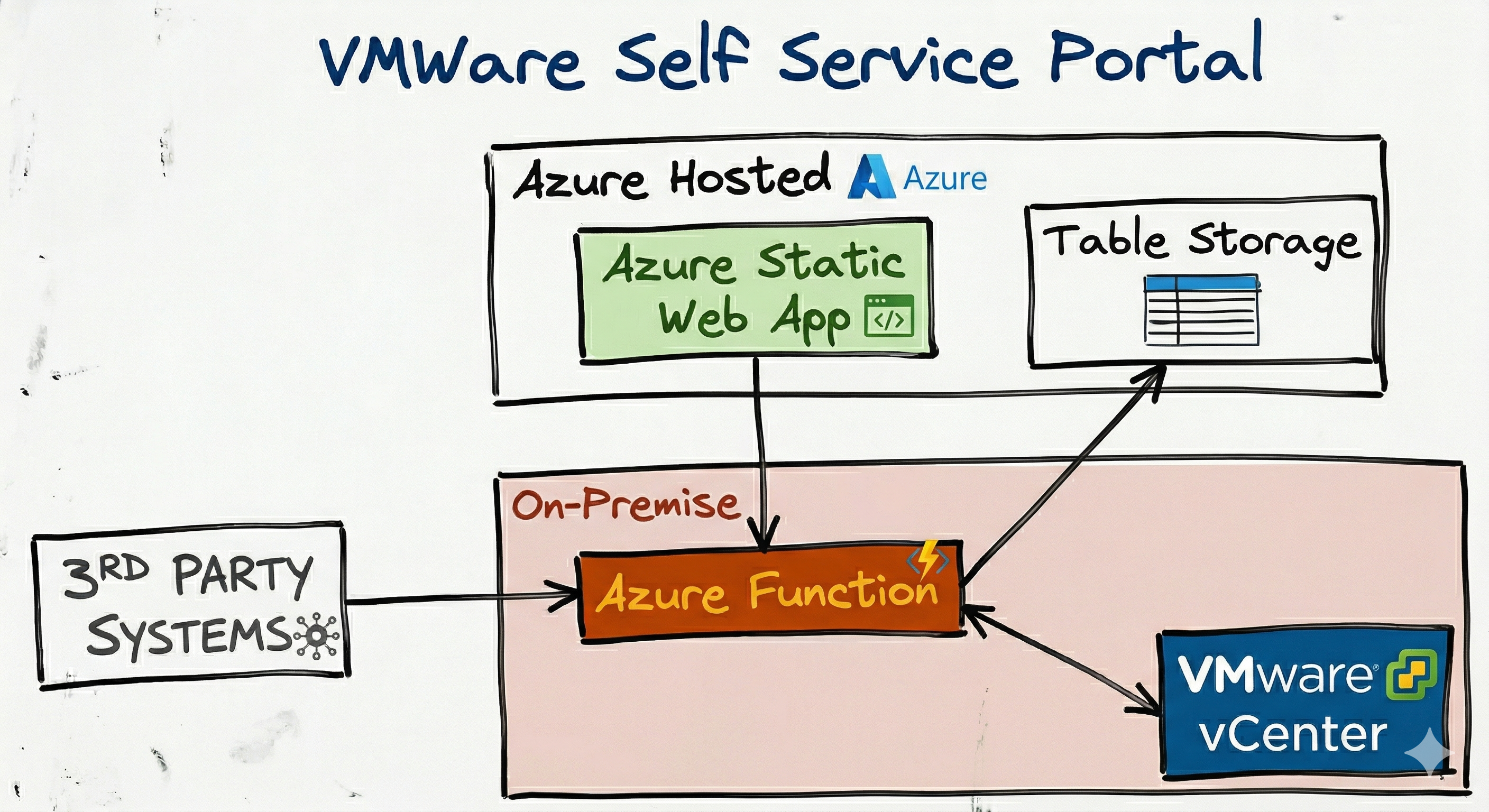
I chose to make the backend in Azure Functions because i think it is a very rich platform for running code in different languages. Microsoft have made it possible to run them in a Docker container, so you are not limited to running them in Azure. My plan was that this backend could run in a container with network access to the vCenter.
Azure Functions can expose your code as a Rest API without you needing to set up a web server or framework for it. You can write PowerShell code that then will run when you call the endpoint, and you can use all the PowerShell modules you want, including PowerCLI. This made it really fast to build the backend, since we can write code without many changes to how we would write a script running locally.
The frontend is plain HTML with Bootstrap, deployed to an Azure Static WebApp. Authentication is handled by Azure Static WebApps and Entra ID.
Configuration - templates, clusters, networks, and system names - is stored in Azure Table Storage. The admin section of the frontend lets you manage these without touching config files. When a user creates a VM, the request goes to the backend API, which reads the config from Table Storage, provisions the VM on vCenter, and records it back.
The API is protected by a function key, which the Static WebApp picks up from a Key Vault secret or environment variable.
Because the frontend and backend are separated by a REST API, the backend is not limited to just the web interface. Other scripts, automation tools, or pipelines can consume the API directly.
The backend
The PowerShell part in Azure Functions is what made this fast to build. We can use commands like: New-VM, Get-Template, Get-Cluster, Get-VirtualPortGroup - we have used used hundreds of times before. The Azure Functions lets you write PowerShell code and expose it as an REST API, as if it was a script running locally.
Since vSphere 7 and later support cloud-init through guestinfo, the backend fetches the cloud-init configuration you have set up as an admin, injects the hostname, and passes it to the VM during provisioning. This means you can update your cloud-init templates without touching VM Templates or redeploying the backend.
William Lam has a great blog post on how to set up cloud-init: Cloud-Init on vSphere.
The frontend
I am not a frontend developer, but I have been writing HTML and CSS for years. I did not want to learn React, Angular, or Vue for this. Bootstrap gets the job done for a simple UI, and the result is just plain HTML and CSS that anyone can edit.
Azure Static WebApps gives you:
- Authentication with Entra ID and role-based access control out of the box.
- A GitHub Actions deployment pipeline when you create the WebApp.
- Custom domains and SSL.
Cost
The Azure Static WebApp in the Standard tier is around $9 per month. Table Storage will be well under $2 per month for most organisations. The backend container runs on any VM or server you already have near vCenter - no additional Azure cost for that.
Total: roughly $10-11 per month. Compare that to a full automation platform with licensing and management overhead.
What I got
So with everything put together, what did I get and what did I learn from this project?
- A self-service portal where users provision VMs with a few clicks.
- An admin section to manage templates, clusters, networks, and system names.
- The possibility to create templates with different cloud-init configurations, all mapping to the same VM Template in vCenter. You could have a "Debian with Docker" and a "Debian with Nginx" template that both use the same vCenter Template but different cloud-init configs.
- A REST API that can be consumed by scripts, pipelines, or other tools.
- Code that is understandable if you know scripting.
- All of this for around $10-11 per month in Azure costs.
Repositories:
Repositories is for demo-purpose only. It is not production-ready code. It is meant to show how you can build something like this and to share the code if you want to use it as a starting point, and if I didn't say it loud enough: Highly AI generated.
What I learned
I used GitHub Copilot CLI to generate most of the code for both repositories. Having Copilot access both repos at the same time meant it could adjust both the backend and frontend when I asked for a change - for example, when I changed how template configuration was stored, it updated both sides in one go.
I spent around 5 hours in total on this project. But you still need to understand what is being generated. You cannot just ask for "a self-service portal" and expect it to be correct. You need to guide it, review the code, and make sure it fits.
I found issues that I would not have caught without experience in the technologies I was using. Some errors looked like backend bugs but were actually about how PowerCLI and VMware work together. Knowing the stack matters.
Video
Here is a short video showing the portal in action: